
An accessibility statement is a page on your website that tells visitors how accessible the site is, which standard you are working to, what still falls short, and how to reach a real person when something blocks them. In Australia, no single law says every private website must carry a page with that exact name. But the Disability Discrimination Act 1992 applies to the information and services you offer online, and a clear, honest statement is the simplest public evidence that you take it seriously. This guide covers what to put in it, how to word it, and where it should live.
TL;DR
- Australian government agencies are expected to publish an accessibility statement. For private organisations it is not a stand-alone legal requirement, but it is a sensible way to show you are meeting your obligations under the Disability Discrimination Act 1992.
- Cover three things at minimum: your commitment, the standard you aim for (WCAG 2.2 Level AA is the sensible target), and several ways to report barriers or request other formats.
- Be honest about gaps. A statement that admits partial conformance and shares a plan builds more trust than a claim of perfection nobody can verify.
- Write in plain language. Say “our videos don’t have captions yet”, not “fails 1.2.2”.
- Link it from the footer of every page under one consistent name: “Accessibility Statement”.
Table of Contents
- Is an accessibility statement required in Australia?
- What a good statement actually contains
- Write it for users, not auditors
- A template you can adapt
- What good examples do
- Where to put it and what to call it
- Before you publish: make sure it is true
- The five types of accessibility the statement should respect
- Our perspective: the statement is a brand page
- Need help with the words, the design or the site?
- Keeping the statement alive
- FAQ
- Sources
Is an accessibility statement required in Australia?
The honest answer depends on who you are.
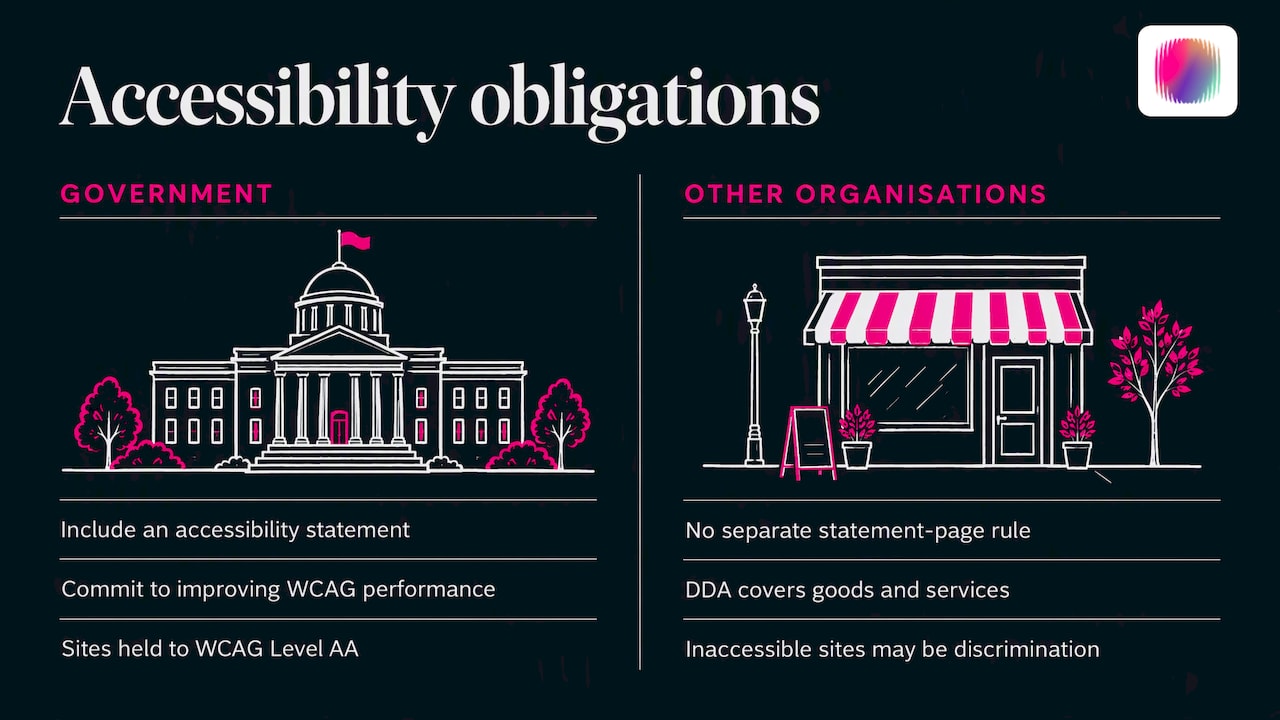
If you are an Australian Government agency, the Style Manual’s guidance on agency responsibilities sets out that agencies should include an accessibility statement and commit to improving their performance against WCAG. Government sites are held to WCAG Level AA.
If you are a charity, social enterprise, startup or established business, there is no separate rule that says “you must publish a page titled accessibility statement”. What does apply is the Disability Discrimination Act 1992 (DDA), which covers areas such as education, employment, banking and the provision of goods and services. The Australian Human Rights Commission has long taken the position that web accessibility is part of non-discrimination, and a website that people with disability cannot use can amount to unlawful discrimination.
So think of the statement as risk management and good practice rather than a box to tick. It shows what you test against, what you know is broken, and what you are doing about it. If a complaint ever lands, that record helps. If you hold a Disability Access and Inclusion Plan, the statement is a natural public companion to it.
This is general information, not legal advice. If you have received a complaint, or you are unsure how the DDA applies to your service, talk to a lawyer who works in discrimination law.
What a good statement actually contains
The W3C’s Web Accessibility Initiative publishes guidance on developing an accessibility statement, including a generator you can download from and then customise. Boiled down, every strong statement has these parts.
1. A commitment in your own words
One or two sentences saying that you want people with disability to be able to use your site, and why. This is where your organisation’s voice shows. “We want everyone to be able to read, book and buy from us” says more than “Company X is committed to compliance.”
2. The standard you work to
Name it: the Web Content Accessibility Guidelines (WCAG). The current version is WCAG 2.2, and Level AA is the usual target. WCAG 2.2 added criteria such as Focus Not Obscured (2.4.11) and Target Size (2.5.8), so if your last audit was against WCAG 2.0 or 2.1, say so and plan an update.
State your current position plainly: fully conformant, partially conformant, or not yet assessed. Do not claim more than you have tested.
3. Contact options that work
Give more than one way to get in touch: an email address, a phone number, and ideally a form. Say who reads those messages and how quickly you aim to reply. Offer to provide content in another format, such as large print, Easy Read, plain text or an accessible PDF.
If your only contact method is a web form that itself has accessibility problems, you have defeated the purpose.
4. Known limitations
List what you know is not working yet, in everyday words, and say when you expect to fix it. Examples:
- “Some older videos do not have captions. We are adding them, starting with our most-viewed videos.”
- “Some PDFs from before 2023 are not tagged for screen readers. Contact us and we will send an accessible version.”
- “Our booking calendar is supplied by a third party and is hard to use with a keyboard. We have asked the supplier to fix it and offer booking by phone in the meantime.”
5. How you tested
Mention the browsers, devices and assistive technology you tried (for example NVDA, VoiceOver, keyboard-only navigation, zoom to 400%), whether you used an external auditor, and the date of the last review. Dates matter: a statement with no date looks abandoned.
6. Ongoing improvement
A sentence or two about what you do on a continuing basis: training staff, checking new content before it goes live, reviewing the site on a schedule. This is the “accessibility is a journey” part, and it should be true, not decorative.
Write it for users, not auditors
The most common mistake is treating the statement as a technical report. Its reader is a person trying to decide whether they can use your service, or a person who just hit a barrier. Both need clear language.
Compare:
| Technical version | Plain-language version |
|---|---|
| Fails SC 1.4.3 Contrast (Minimum) on secondary buttons | Some button text is hard to read against its background |
| Fails SC 1.2.2 Captions (Prerecorded) | Our videos don’t have captions yet |
| Non-text content lacks text alternatives | Some images don’t have descriptions for screen readers |
| Fails SC 2.1.1 Keyboard in the checkout widget | You can’t complete checkout using only a keyboard. Call us on the number below and we’ll take your order |
The W3C guidance makes the same point: describe the barrier the person meets, and keep the criterion numbers for your internal audit report. You can attach the full audit separately for those who want it.
A few more writing rules that hold up:
- Use short sentences and common words. Aim for a reading level that most adults handle comfortably.
- Use “we” and “you”.
- Avoid phrases like “fully accessible” or “100% compliant”. They are rarely verifiable and invite criticism.
- Put the contact details near the top, not buried at the bottom.
- Make sure the statement page itself passes the checks it describes.
If you already have written brand voice guidelines, use them here. Our guide on writing brand voice guidelines covers how to pin down tone so pages like this sound like you and not like a legal template.
A template you can adapt
Copy this structure and replace the bracketed parts with true statements about your own site. Delete anything you cannot stand behind.
Accessibility Statement
Our commitment. [Organisation name] wants everyone to be able to use our website, including people with disability, older people and people who use assistive technology. [One sentence about why this matters to your organisation.]
The standard we use. We aim to meet the Web Content Accessibility Guidelines (WCAG) 2.2 at Level AA.
Where we are now. We last reviewed this website on [date]. [We tested it ourselves / an independent auditor tested it]. We found it [fully / partly] meets WCAG 2.2 Level AA.
What you can do on this site. You should be able to zoom in to 400% without losing content, move through pages using only a keyboard, and use a screen reader to read most pages. [Edit to match what you have tested.]
What isn’t working yet. [List each known problem in plain words, with what you are doing and when.]
Tell us about a barrier. Email [address], call [number], or use our [form link]. We read every message and aim to reply within [number] business days. If you’d like information in another format, such as large print, Easy Read or audio, ask and we will provide it.
How we keep improving. [Staff training, review schedule, checking new content, involving people with disability in testing.]
This statement was last updated on [date].
That is the skeleton. The wording around it is where your organisation’s personality goes.
What good examples do
The best way to sharpen your own draft is to read real statements from Australian organisations. A few patterns stand out.
The Attorney-General’s Department’s accessibility statement links accessibility back to the Disability Discrimination Act, lists the measures it takes internally, names the standard and the month of its latest audit, and says the site is partially conformant with WCAG 2.2 Level AA, naming the embedded video player as the cause. That specificity is what makes it credible.
The Style Manual’s own statement gives postal and email contacts, a compliance status, and a short list of remaining issues in plain language. It is short and it does the job.
Outside government, a roundup of exemplary statements points to warm, respectful tone and a dedicated “Accessibility is a Journey” section as things that set the good ones apart. If you want a public-sector structure to borrow, the UK’s model accessibility statement is a thorough outline, though its legal wording applies to UK public bodies, not Australian organisations.
Notice what the good examples share: a date, a named standard, honest gaps, and a real way to get help. None of them sound like a disclaimer.
Where to put it and what to call it
Place a link in the footer of every page and call it “Accessibility Statement”. Use the same name everywhere: website, mobile app, and any platform you control. The Style Manual guidance recommends consistent, prominent link names, and warns that burying the statement under labels like “Site policies” or “Help” makes it harder to find and can look like an attempt to hide limitations.
Two practical extras:
- Link to it from your contact page and from any form, so someone who hits a barrier can reach it quickly.
- If you run social channels, mention in your profile or pinned post how people can request accessible versions of your content. The Digital NSW social media guidance is a good primer on captions, alt text and hashtags.
Before you publish: make sure it is true
A statement is only as good as the audit behind it. Before you write a line about conformance, run through the basics:
- Test with the keyboard alone. Can you reach every link, menu and form field, see where focus is, and leave every pop-up?
- Zoom to 400%. Does the layout reflow without hiding content or forcing sideways scrolling?
- Check colour contrast on text, buttons and form fields.
- Run a screen reader on your most important pages: home, contact, key service pages, any checkout or booking path.
- Caption and transcribe video and audio.
- Read every image’s alt text and remove the ones that say “image of” or repeat the caption.
- Check forms: labels, error messages, and time limits.
- Review PDFs and downloads. Untagged PDFs are one of the most common gaps.
Automated checkers catch only part of the problem, so combine them with manual checks and, if you can, testing by people who use assistive technology daily. Our website accessibility audit checklist for Australian organisations walks through this in more detail.
The quick WCAG reference, How to Meet WCAG, filters the success criteria down to Level AA so you can see exactly what is in scope.
The five types of accessibility the statement should respect
Readers often ask what the “types” of accessibility are. WCAG is organised around four principles, summarised as POUR: content must be Perceivable, Operable, Understandable and Robust. In practice, the barriers fall into groups that your statement should show you have thought about:
- Vision: blindness and low vision, which means screen reader support, contrast and text resizing.
- Hearing: deafness and hearing loss, which means captions and transcripts.
- Movement: limited dexterity or paralysis, which means keyboard access, big enough targets and no reliance on precise gestures.
- Cognitive and learning: memory, attention, reading and language differences, which means plain language, consistent layout and enough time.
- Neurological and photosensitivity: conditions such as epilepsy, which means nothing that flashes dangerously.
You do not need to list these in the statement. But if your limitations section covers only vision and ignores cognitive access, that is a signal to look harder.
Our perspective: the statement is a brand page
Most organisations hand the accessibility statement to whoever has a spare afternoon: a developer, an office manager, a lawyer. The result is a dense page of passive voice that tells a person with disability, in effect, “we’ve covered ourselves.”
We see it differently. Our team includes people with lived experience of disability, and what we hear again and again is that the statement is often the first place a disabled visitor decides whether an organisation means what it says. If it reads like a compliance memo, the rest of your messaging about inclusion loses credibility. If it reads like a person wrote it, and admits what isn’t working yet, trust goes up.
That is especially true for disability organisations and social enterprises. You are held to a higher standard by your own community, and rightly so. Three things we would do:
- Involve people with disability in the drafting. Ask them to read the draft and tell you what feels sterile, evasive or patronising.
- Write the statement in your brand voice. If your tone is warm and direct everywhere else, it should be here too.
- Treat the gaps as a public roadmap. Say what you’ll fix, then fix it and update the date.
A statement that does this becomes a branding touchpoint, not a liability.
— Tommy
Need help with the words, the design or the site?
If you want the statement to sound like your organisation, and your website and brand materials to match, that is the work we do at DISBRANDED. Our brand strategy, design and web services are delivered by a team with lived disability experience, so the inclusive thinking is built in from the start rather than bolted on afterwards. If your messaging needs a clearer base first, start with our brand messaging framework guide.
Keeping the statement alive
An out-of-date statement is worse than none, because it shows you stopped paying attention. Build a light routine:
- Review at least once a year, and after any major redesign, new platform or new booking system.
- Update the date every time you review, even if little changes.
- Log every report from users and track it to resolution. Reply to the person who raised it.
- Check third-party tools (calendars, payment widgets, embedded video) whenever the supplier updates them.
- Brief new staff and anyone who publishes content on what accessible publishing means for your organisation.
If you are planning a rebrand, fold the accessibility review into it, so new colours, type and templates are checked before launch. Our rebrand rollout plan shows where such checks fit.
FAQ
Is an accessibility statement legally required in Australia?
There is no single law requiring every private website to carry a page called an accessibility statement. The Disability Discrimination Act 1992 does require that information and services provided online be accessible, and government agencies are expected to publish a statement. For everyone else, it is best practice and useful evidence of good faith. For a specific situation, speak to a discrimination lawyer.
Which WCAG version and level should I state?
Aim for WCAG 2.2 Level AA and say so. If your site has only been tested against an earlier version, say that honestly and note when you plan to reassess. Claiming a level you have not tested is the quickest way to lose trust.
How long should an accessibility statement be?
Long enough to cover commitment, standard, current status, known gaps, contact options and the review date, and no longer. For most small and mid-sized organisations that is 300 to 600 words in plain language. Put the contact details near the top.
Can I just copy a template?
Use a template for the structure, but write every statement of fact yourself. Copying wording that claims things you have not tested creates risk. Reading the same words on a hundred sites also tells visitors you did not put thought into it.
Where should the link go?
In the footer of every page, under the same label, “Accessibility Statement”. Add links from the contact page and forms so someone facing a barrier can find it fast.
Sources
- Agency responsibilities and commitments, Style Manual
- Web accessibility and Government 2.0 (2009), Australian Human Rights Commission
- Developing an Accessibility Statement, W3C WAI
- Web Content Accessibility Guidelines (WCAG) 2.2, W3C
- Accessibility statement, Attorney-General’s Department
- Accessibility statement for the Style Manual
- 5 Exemplary Accessibility Statement Examples, AccessibleWeb
- Model accessibility statement, GOV.UK
- Social media, Digital NSW
- How to Meet WCAG (Quick Reference), W3C